1. Download msx264 plugin source code.
2. Run sudo apt-get install libmediastreamer-dev libx264-dev libavcodec-dev libswscale-dev libtheora-dev to meet msx264's dependency requirements.
3. Run ./configure --prefix=/usr/lib. It's mandatory to set prefix to /usr/lib, because linphone can't find the plugin if it's installed in default location, /usr/local/lib.
4. Run sudo make install.
5. Change the line 393 in src/msx264.c from
393 if (sws_scale(s->sws_ctx,(uint8_t * const*)orig->data,orig->linesize, 0,
393 if (sws_scale(s->sws_ctx,(uint8_t **)orig->data,orig->linesize, 0,
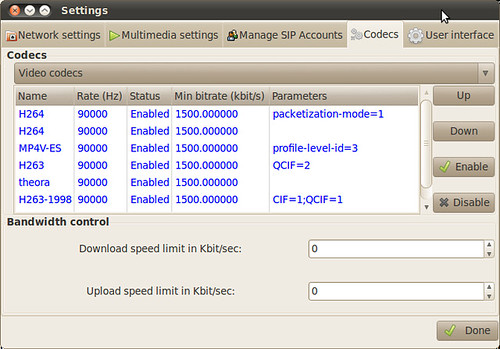
6. Restart linphone, the h.264 plugin should be available now.


4 comments:
Thank you very much for leading me to this information. I can't say that it has fully resolved my video issues but it *did* provide the promised plugin.
I have a few modifications to your tutorial which were necessary on my ubuntu lucid machine. They are, based on your above steps:
2. Had to add libsdl1.2-dev to your dependency mix PRIOR to the next step.
3. Should be: ./configure --prefix=/usr
Your prefix resulted in the program's being installed in /usr/lib/lib/~, where linphone was unable to find it.
5. Typo, "line 293" should be "line 393".
With these changes everything worked as promised!
Thanks for pointing them out.
Did all steps, not plugin in linphone. Does not work with Ubuntu 12.04 and linphone 3.5.2
Under Ubuntu 12.04:
create folder /usr/lib/liblinphone/plugins
and copy plugin from
/usr/lib/mediastreamer/plugins here
Post a Comment