Saturday, April 24, 2010

why I prefer wireshark to network monitor

Personally, I prefer wireshark to network monitor for:
  1. Wireshark runs on many platforms including windows, linux, mac os x, etc. I need to work both on linux and windows, and I'd like to keep my toolbox as compact as possible.
  2. Wireshark uses a widely adopted syntax for capture filters and disply filters which dare I call them de facto. The same syntax is used in windump and tcpdump. I don't need to remember additional syntax even work in a GUI-less environment.
  3. Filters in wireshark seems to be more powerful. For example, the filter "tcp.flags.syn==1" enables me to view tcp SYN messages only.  Based on my limited experience with network monitor, I'm not aware if it can filter at this granularity.

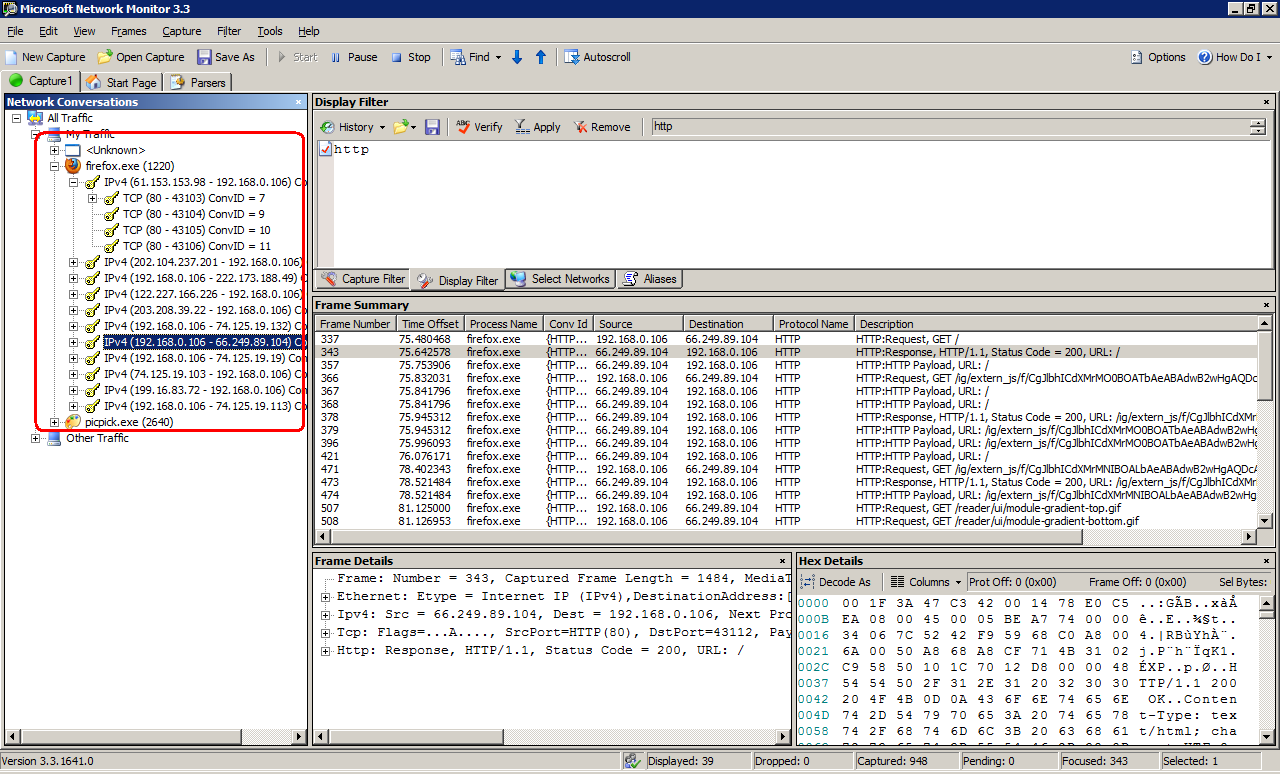
But network monitor has the advantage of being able to categorize network messages by processes. As shown in the image below:

It's a very convenient feature that helps me easily find out messages I'm interested in. Especially when I need to debug a process whose port numbers are picked at random or dynamically.

Friday, April 23, 2010

standalone windbg v6.12.0002.633

I read from Tomas's post that newer version windbg can't be downloaded from microsoft directly anymore. To get newer windbg, we have to download the huge 620 mb WDK iso and extract windbg installer from it manually. The newest windbg standalone installer is version 6.11.1.404, released on March 27, 2009.
I don't know if microsoft will listen to our customer's voice and release a standalone windbg. Before they will, for the convenience for developers like me, here is extracted windbg package:

windbg 6.12.0002.633 x86   http://rxwen-blog-stuff.googlecode.com/files/windbg_6.12.0002.633_x86.zip
md5sum:   abdad1a805f7d89d461b4569b216001d
sha1sum:  3715d726363524643a6df561bf9d27e7acb49307

windbg_6.12.0002.633_64_installer    http://rxwen-blog-stuff.googlecode.com/files/windbg_6.12.0002.633_64_installer.zip
md5sum:  62fc3d313081f96fea3f69c4d06700a1
sha1sum:  d79e6f40c08a95d5653c0eb0cc7d64c8bea8e391


A noticable change of this version is: ADPlus V7.0 is a total rewrite of ADPlus. ADPlus is now written in managed code which will allow us to add new features much easier. The old version is renamed to adplus_old.vbs. This page lists more changes of the new version.

Hope it helps.

Wednesday, April 21, 2010

Use google.com instead of google.com.hk

After google moved their service from china mainland to hongkong, I can't access google.com or google.cn from mainland anymore. I always get redirected to google.com.hk. Based off my experience with google.com.hk, it shows more noise information than google.com and google.cn. Because in most cases, results in transitional chinese aren't what I'm looking for.

To force the browser using google.com, we can visit the url http://www.google.com/ncr. After it has been visited once, all subsequent requests for google.com won't be redirected to google.com.hk anymore. Hooray!

Sunday, April 18, 2010

Override CheckMediaType with care

A problem I encountered while developing my source filter's output pin is that inside FillBuffer method, the media type and size of the media sample is not exactly the same as the one I proposed in GetMediaType method. The strange thing is my pin has successfully negotiated with downstream renderer filter (its actual type is Video Mixing Renderer-9 filter), and its input pin has agreed to use the media type my filter proposed. So why the actual media type being used changes?

The answer lies in this document, handling format changes from the video renderer:

Video Mixing Renderer Filter
The Video Mixing Renderer filter (VMR-7 and VMR-9) will connect with any format that is supported by the graphics hardware on the system. The VMR-7 always uses DirectDraw for rendering, and allocates the underlying DirectDraw surfaces when the upstream filter connects. The VMR-9 always uses Direct3D for rendering, and allocates the underlying Direct3D surfaces when the upstream filter connects.
The graphics hardware may require a larger surface stride than the image width. In that case, the VMR requests a new format by calling QueryAccept. It reports the surface stride in the biWidth member of the BITMAPINFOHEADER in the video format. If the upstream filter does not return S_OK from QueryAccept, the VMR rejects the format and tries to connect using the next format advertised by the upstream filter. The VMR attaches the media type with the new format to the first media sample. After the first sample, the format remains constant; the VMR will not switch formats while the graph is running.

During the connecting phase, after both filters' pins have agreed on a media type, they perform allocator negotiation. And the downstream pin proposed a larger biWidth during allocator negotiation. As a result to the new proposal, our pin's QueryAccept method is called. If we don't override it, the default implementation of grandpa class CBasePin comes into play. CBasePin::QueryAccept internally calls CheckMediaType method to see if the newly proposed media type can be accepted. Because our pin's CheckMediaType method's original implementation is too sloppy without examining all fields of the new media type, so we ended in the situation I described at the beginning of the post.

So, the best practice for creating a source filter is we need to handle CheckMediaType carefully. Or we can take the alternative way of overriding the QueryAccept method to handle media type change explicitly.

References:
How to Write a Source Filter for DirectShow
Core Media Technology in Windows XP Empowers You to Create Custom Audio/Video Processing Components

Sunday, April 11, 2010

Thoughts on directshow

In this post, I'll summarize some features that make directshow stand out, from a developer's point of view.

The architecture of directshow is:

The core of directshow framework is the box in the center.

1. separation of concerns
Directshow divides a complex media rendering task into a bunch of smaller tasks, organized as different filters. Each filter has its own concentration, e.g., grabbing data from source media file, decoding data, rendering the data on display. It's more natural and easier for our brain to resolve complex problems in smaller steps, one by one. Another benefit of this breakdown structure is we can perform unit test on smaller component more easily.

2. mature abstraction layer
Directshow provides a mature abstraction layer on top of sub-tasks' concrete implementations (Adapter pattern). The existence of the abstraction layer makes our project easier to manage. The cost for dealing with changes can be minimized. For example, we can have one guy tries to implement a hardware based decoder filter. And before his filter is available, other guys in charge of other parts can use a software based decoder filter instead. After the hardware based filter is done, it's hopeful to replace the software based filter without requiring changes on other parts because interfaces of both filters are the same.

3. built-in multimedia functions
Besides being a sophisticated core framework, directshow also contains a lot of commonly used multimedia features like common media type decoders, some splitters, and multi-stream synchronizer. With these features built-in, we developers' life will be a lot easier.

References
MSDN: Directshow System Overview
http://en.wikipedia.org/wiki/DirectShow

Saturday, April 3, 2010

directshow debugging tips

1. View graph
When we render a media file, directshow uses intelligent connect to build a working graph for us. It may add some filters implicitly if necessary. From my perspective, it all happens transparently. It's user friendly and powerful. But while debugging, we need to know exactly how is the graph constructed and connected, at runtime. Directshow provided a utility method AddGraphToRot in %WINSDK%\Samples\multimedia\directshow\common\dshowutil.h. We can use it to register our graph to running object table, and then view the graph in graphedit. After the graph has been registered, we select File - Connect to Remote Graph in graphedit to bring up remote filter graph list. Then select the registered graph to view.


2. Keep log
IGraphBuilder exposes a SetLogFile method that can be used to specify a log file. Once set, all of the graph's activities will be saved to the log file, including how filter's are connected, how the graph attempted to connect pins. These information are valuable for debugging filters.
pGraph->SetLogFile((DWORD_PTR)CreateFile(TEXT("C:\\graph_builder.log"), GENERIC_WRITE, 0, NULL, CREATE_NEW, FILE_ATTRIBUTE_NORMAL, NULL));

3. Dump graph
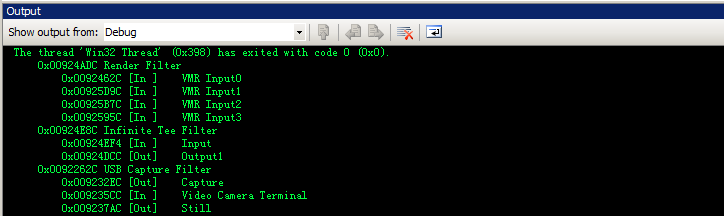
In the log file generated by graph, components (filter and pin) are identified with their address in memory. The friendly name of the component isn't shown which make the log file harder to understand by human. Here is a small utility function that dumps all filters and their pins with corresponding memory address and name, in the format shown below.

Monday, March 29, 2010

Total Commander, what a weapon!

I've used freecommander for years. It greatly improves my efficiency. Unfortunately, for some unkonwn reasons, my freecommander configuration file get corrupted after my machine power down unexpectedly several days before. Rather than making these configurations from scrarch again, I decided to give Total Commander a shot.

After I tried TC, I found it's far more powerful. TC is fully customizable, I can define any shortcut key combinations for TC internal commands or external commands defined by me. In FC, only Ctrl+[Number] is allowed to be set as shortcut key for external commands.
The most promising feature for TC is its plugin system. There are so many wonderful plugins that make TC so powerful. With packer plugin, I don't need a stand alone zip/tar/bzip2 applicaitons. With some creative filesystem plugins, task manager, regedit, dependency walker are not necessary any more. By using plugins, I can perform a lot of totally different tasks in a consistent manner, just manipulate some (fake) files in TC. This is very similar to abstraction in linux, where everything can be examined and manipulated like normal files. Abstract thinking should always be a popular idea among programmers, so I'm totally fascinated by TC.

Suggestions for Total Commander

1. Add global shortcut key. It's more convient to active total commander application with global shortcut key than pressing ctrl+tab sereval times. Though this can be achieved with tools like autohotkey, it's better if TC natively support global shortcut.

2. Improvement on command line. In windows console and linux shell, we can use tab key to complete file/command name. It's fabulous if TC also support this feature.

Wednesday, March 24, 2010

change command prompt font

Having used consolas font for a period, I felt very comfortable with it. I've used it in putty, vim, visual studio. And I tried to use it in windows console (cmd.exe) by following scott's post, Using Consolas as the Windows Console Font. But consolas font didn't show in console's available font list. It seemed to have to do with my console code page setting, which is 936 chinese gbk. Consolas was shown after I changed the console's code page to 850 with chcp command. Thing was not perfect, I could not use chinese input method under this code page in console, and chinese characters are not displayed correctly.
As a matter of fact, there is another way to set consolas font for console through registry, which doesn't require us to change code page. Our preferences for default console are saved in HKCU\Console, including console's width, height and font. Subitems of this key save preperences for console with specified title. So we can modify the FaceName item to force a font get applied. As shown below.

Windows Registry Editor Version 5.00

[HKEY_CURRENT_USER\Console]
"FaceName"="Consolas"

[HKEY_CURRENT_USER\Console\%SystemRoot%_system32_cmd.exe]
"FaceName"="Consolas"


Here is a snapshot of the font comparison:

BTW, consolas font is designed specifically for ClearType. It looks extremely poor if ClearType is not enabled. We can use ClearType Tuner PowerToy to fine tune ClearType under windows xp.

References:
Necessary criteria for fonts to be available in a command window
Give Your Eyes a Treat

Monday, March 22, 2010

getting start with osip

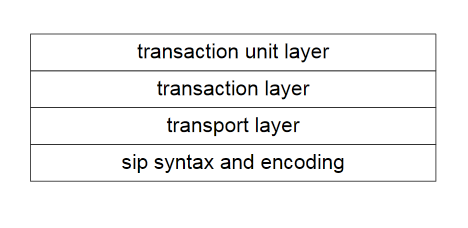
As described in rfc3261, sip is a layered protocol. Its layers are shown in the image below.

Unlike other sophisicated sip libiraies, exosip, pjsip, mjsip, which implement all layers of sip protocol, oSip library doesn't implement transport layer. oSip claims it doesn't provide high level api for controlling SIP session, it only provides api for sip message parsing, sdp message parsing and transaction handling. The api contains implementation for syntax, transaction and transaction unit layer.
So, in order to use oSip in our own application, we need to implement transport layer, and hook the transport layer with the oSip library.

Core structures of oSip
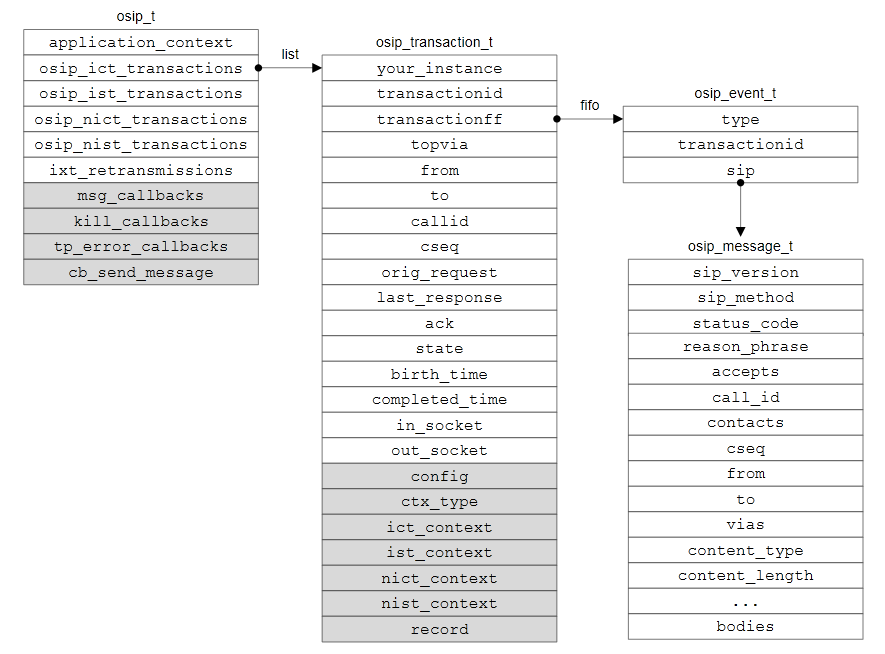
oSip library has four core structures, osip_t, osip_transaction_t, osip_event_t, osip_message_t. osip_t is the context of the sip library runs in. osip_transaction_t defines transaction which composes of a request message and all subsequent response messages related to the request. osip_event_t defines event inside transaction pending on handling. osip_message_t is the mapping from sip message syntax to c structure.

osip_t has four lists of transactions, each corresponds to a kind of transaction. For instance, if our sip application makes a call to another sip application, our application runs as uac (User Agent Client). A transaction is created and added to the osip_ict_transactions ( ict is short for invite client transaction) list. In the application being called, a transaction is also created and added to the osip_ist_transactions (ist is short for invite server transaction).
There are three members, msg_callbacks, kill_callbacks and cb_send_message in osip_t. They store callbacks to be called while handling events of transaction. They are designed as internal members. The proper way to add callbacks is using following apis: osip_set_cb_send_message, osip_set_message_callback and osip_set_kill_transaction_callback.

osip_transaction_t contains many members. Among them, the most important ones are:
  • transactionid, which uniquely identifis a transaction
  • state, which shows current state of the transaction
  • transactionff, a fifo containing all events belonging to this transaction
osip_event_t is used to represent an event pending on processing. It doesn't contain much information. It only has the transactionid of the owning transaction, the type of the event and a pointer to the sip_message_t correlate with the event. An event is usually constructed accompany with a sip_message_t instance. For example, upon receiving a incoming request, we can use osip_parse function to parse the received string to a osip_message_t instance, meanwhile, a osip_event_t instance will be created and returned. osip_event_t instance is only useful after it has been added to a transaction's event fifo. This can be done with osip_transaction_add_event or osip_find_transaction_and_add_event functions.

After events have been added to fifo, we need to call osip_xxx_execute functions to actually handle them. There are four osip_xxx_execute functions, each will handle all events belong to a transaction category. For example, osip_ist_execute function will iterate through all IST transactions in osip_ist_transactions list, loop through all events in each transaction's transactionff, call corresponding callback functions depending on the type of the event.

How to use oSip
To use oSip library, we usually follow below steps:
  1. Initialize oSip and setup callback functions
  2. Implement transport layer. In most cases, we create a socket based transport layer.
  3. Create/add events by parsing incoming messages
  4. Call osip_xxx_execute function to process all events
Here is a basic sample:
http://code.google.com/p/rxwen-blog-stuff/source/browse/trunk/protocol/basic_osip_sample/basic_osip_sample.cpp
This sample is a UAS(callee) for windows, and just show the basic steps of using oSip without error handling.

Something useful
  • It's strongly recommended not to run time consuming or indefinite ending tasks inside callback functions, otherwise, the osip main procedure will be blocked until the callback finishes.
  • oSip has provided a wrapper layer above native system apis to make it portable. In order to use its multi-thread feature (which is almost always necessary), we need to define OSIP_MT macro in our application.
  • In most cases, we don't need to concern about freeing of transaction & message instances. Their life time are managed by the osip runtime, through state machine.

Monday, February 1, 2010

native programming with android building system

In the previous post, native programming on android, I showed how to use code sourcery toolchain to do native programming on android. But in that way, we must link c library statically into our application, which is not desirable. So, in this post, I'll show how to do native programming with the android built-in building system.

For demonstration purpose, I'll create a logtest application. The application relies on cutils lib and writes some log information that can be examined through "adb logcat" command.

1. Initialize android source tree
In later steps, I'll use $ANDROID_SRC to refer to the root of the android source tree.

2. Create a directory for your application within the source tree
One advantage of android building system is it doesn't require your application to follow a specific organization structure. Your application can be placed in any directory. I created $ANDROID_SRC/logtest folder for the application.

3. Create an Android.mk file for the application in the directory
Android.mk is a reserved file name to indicate a module. This file describes how to build the module. By defining LOCAL_MODULE variable, we can assign a name to our application.
Depending on the type of the module, we include $(BUILD_EXECUTABLE), $(BUILD_DYNAMIC_LIBRARY) and $(BUILD_STATIC_LIBRARY) respectively at the end of the Android.mk.

4. Specify source files for the application
Through LOCAL_SRC_FILES variable, we specifies which source files are necessary to compile the module. Paths to source files are represented relative to the location of the Android.mk file.

5. Specify dependencies
Through LOCAL_SHARED_LIBRARIES variable, we can specify other libraries that our module depends on.

6. Build application
Go to root of Android source tree, and type make $(LOCAL_MODULE) to build the application which will be placed at $ANDROID_SRC/out/target/product/generic/system/bin/logtest.


Tips:

1. show commands
By default, android building system disables command echoing. It's hard to find out and correct dependency relationships without seeing the actual command. To change this behavior, we can append the showcommands pseudo target.
For example:
make logtest showcommands

2. quick build
Android building system need to find and parse Android.mk files within the source tree, and analysis dependencies. It's a time consuming task. In fact, there is a quicker way to build a module.
cd $ANDROID_SRC
source build/envsetup.sh
mmm {path_to_module_to_be_built} showcommands


3. build host module
Android building system can also used to generate modules for the host machine. An example is the adb application. To build host module, we can use:
include $(BUILD_HOST_EXECUTABLE) # $(BUILD_HOST_STATIC_LIBRARY)

4. disable prelink
We may encounter the error below while compiling a shared library:
build/tools/apriori/prelinkmap.c(168): library '***.so' not in prelink map
This is because android tries to prelink shared library with apriori tool by default, but our library isn't presented in the build/core/prelink-linux-arm.map. Thus the error. To get rid of it, we can add the line below in Android.mk to disable prelink.
LOCAL_PRELINK_MODULE := false

The demo can be found at:
http://code.google.com/p/rxwen-blog-stuff/source/browse/trunk/android/logtest/

Reference:
Android Building System
Android build system

Wednesday, January 20, 2010

windbg sos.dll version issue

I debugged a .net 1.1 based windows application which exits silently upon start up. The problem itself is trivial and not worth mentioning. What I want to say is there is a subtle point about sos.dll version.

When I was debugging, I started the application under windbg. Then issue ".loadby sos mscorwks" command to load sos.dll extension corresponds to the running .net framework. And I entered !DumpAllExceptions command which should exist in sos.dll for .net framework 1.1, but ended in not finding this command:
   No export DumpAllExceptions found
Finally, I had to use "!DumpHeap -type Exception" to find out all exceptions.

Having done some investigation, I found there are two sos.dll files for .net 1.1. One in .net framework installation folder, and one in windbg installation folder. The latter one is a full featured extension and support DumpAllExceptions command.
I tried debugging the application again with sos.dll comes with windbg by issusing: ".load windbg_installation_folder/clr10/sos.dll". This time, DumpAllExceptions was back to life and worked like a charm.
BTW, an alternative way to do !DumpAllExceptions is to take advantage of .foreach command.
   .foreach(exception {!DumpHeap -type Exception -short}) {!do exception; .echo print exception done !!! *****************}

For convenience, below are commands supported by different version sos.dll.


C:\WINDOWS\Microsoft.NET\Framework\v1.1.4322\SOS.dll
0:000> !help
SOS : Help
COMState             | List COM state for each thread
ClrStack             | Provides true managed stack trace, source and line numbers.
                       Additional parameters: -p[arams] -l[ocals] -r[egs] -a[ll].
DumpClass      | Dump EEClass info
DumpDomain []  | List assemblies and modules in a domain
DumpHeap [-stat] [-min 100] [-max 2000] [-mt 0x3000000] [-type ] [-fix] [start [end]] | Dump GC heap contents
DumpMD         | Dump MethodDesc info
DumpMT [-MD]   | Dump MethodTable info
DumpModule     | Dump EE Module info
DumpObj        | Dump an object on GC heap
DumpStack [-EE] [-smart] [top stack [bottom stack] | -EE only shows managed stack items.
DumpStackObjects [top stack [bottom stack]
DumpVC    | Dump a value class object
EEHeap [-gc] [-win32] [-loader] | List GC/Loader heap info
EEStack [-short] [-EE] | List all stacks EE knows
EEVersion            | List mscoree.dll version
FinalizeQueue [-detail]     | Work queue for finalize thread
GCInfo [] [IP]   | Dump GC encoding info for a managed method
GCRoot         | Find roots on stack/handle for object
IP2MD          | Find MethodDesc from IP
Name2EE | Find memory address of EE data given a class/method name
ObjSize []     | Find number of bytes that a root or all roots keep alive on GC heap.
ProcInfo [-env] [-time] [-mem] | Display the process info
RWLock [-all] | List info for a Read/Write lock
SyncBlk [-all|#]     | List syncblock
ThreadPool           | Display CLR threadpool state
Threads              | List managed threads
Token2EE  | Find memory address of EE data for metadata token
u [] [IP]        | Unassembly a managed code


{windbg installation folder}\clr10\sos.dll

0:000> !help
Did you know that a lot of exceptions (!dumpallexceptions) can cause memory problems. To see more tips, run !tip.
-------------------------------------------------------------------------------
SOS is a debugger extension DLL designed to aid in the debugging of managed
programs. Functions are listed by category, then roughly in order of
importance. Shortcut names for popular functions are listed in parenthesis.
Type "!help " for detailed info on that function.

Object Inspection                  Examining code and stacks
-----------------------------      -----------------------------
DumpObj (do)                       Threads (t)
DumpAllExceptions (dae)            CLRStack
DumpStackObjects (dso)             IP2MD
DumpHeap (dh)                      U
DumpVC                             DumpStack
GCRoot                             EEStack
ObjSize                            GCInfo
FinalizeQueue                      COMState
DumpDynamicAssemblies (dda)        X
DumpField (df)                     SearchStack
TraverseHeap (th)
GCRef

Examining CLR data structures      Diagnostic Utilities
-----------------------------      -----------------------------
DumpDomain                         VerifyHeap (vh)
EEHeap                             DumpLog
Name2EE                            FindAppDomain
SyncBlk                            SaveModule
DumpASPNETCache (dac)              SaveAllModules (sam)
DumpMT                             GCHandles
DumpClass                          GCHandleLeaks
DumpMD                             FindDebugTrue
Token2EE                           FindDebugModules
EEVersion                          Bp
DumpSig                            ProcInfo
DumpModule                         StopOnException (soe)
ThreadPool (tp)                    TD
ConvertTicksToDate (ctd)           Analysis
ConvertVTDateToDate (cvtdd)        Bl
RWLock                             CheckCurrentException (cce)
DumpConfig                         CurrentExceptionName (cen)
DumpHttpRuntime                    ExceptionBp
DumpSessionStateConfig             FindTable
DumpBuckets                        LoadCache
DumpHistoryTable                   SaveCache
DumpRequestTable                   ASPXPages
DumpCollection (dc)                DumpGCNotInProgress
DumpDataTables                     CLRUsage
GetWorkItems                                               
DumpLargeObjectSegments (dl)    
DumpModule
DumpAssembly                       Other
DumpMethodSig                      -----------------------------
DumpRuntimeTypes                   FAQ
PrintIPAddress
DumpHttpContext
DumpXmlDocument (dxd)


C:\WINDOWS\Microsoft.NET\Framework\v2.0.50727\SOS.dll
0:000> !help
-------------------------------------------------------------------------------
SOS is a debugger extension DLL designed to aid in the debugging of managed
programs. Functions are listed by category, then roughly in order of
importance. Shortcut names for popular functions are listed in parenthesis.
Type "!help " for detailed info on that function.

Object Inspection                  Examining code and stacks
-----------------------------      -----------------------------
DumpObj (do)                       Threads
DumpArray (da)                     CLRStack
DumpStackObjects (dso)             IP2MD
DumpHeap                           U
DumpVC                             DumpStack
GCRoot                             EEStack
ObjSize                            GCInfo
FinalizeQueue                      EHInfo
PrintException (pe)                COMState
TraverseHeap                       BPMD

Examining CLR data structures      Diagnostic Utilities
-----------------------------      -----------------------------
DumpDomain                         VerifyHeap
EEHeap                             DumpLog
Name2EE                            FindAppDomain
SyncBlk                            SaveModule
DumpMT                             GCHandles
DumpClass                          GCHandleLeaks
DumpMD                             VMMap
Token2EE                           VMStat
EEVersion                          ProcInfo
DumpModule                         StopOnException (soe)
ThreadPool                         MinidumpMode
DumpAssembly                     
DumpMethodSig                      Other
DumpRuntimeTypes                   -----------------------------
DumpSig                            FAQ
RCWCleanupList
DumpIL

Ex 15.4-5 of introduction to algorithms

Question:
Give an O(n squared)-time algorithm to find the longest monotonically increasing subsequence of a sequence of n numbers.

Answer:
A brute-force approach is enumerate all subsequences of the n numbers and find out a monotonically increasing one with the longest length. This algorithm has a poor exponential running time.
This problem exhibit optimal substructure and overlapping subproblems properties, and is suited for dynamic programming.

Let A denotes the array of n numbers, A[i] is the ith number of the array.
Let P{i,j} denotes problem of finding the longest monotonically increasing subsequence. So the original problem is P{1,n}.
Let S(i,j) denotes the length of longest subsequence of P{i,j}.
Let M(i,j) denotes the largest number in the longest subsequence of P{i,j}. Note for P{i,j}, there may exist several subsequence has the same longest length, M(i,j) should be the smallest one of them.

For P{1,j}, if A[j] is larger than M(1,j-1), then S(1,j) equals S(1,j-1) plus 1. Otherwise, it equals S(1,j-1).
So, we have:
  S(1,j) = S(1,j-1) if A[j] <> M[1,j-1]

The complicated thing in this procedure is how to maintain M's value correctly. The idea is if A[j] is larger than M(1,j-1), M(1,j) should be A[j]. If A[j] is smaller than M(1,j-1), M(1,j) should either be M(1,j-1) or A[j] if A[j] is larger than M(1,x) where S(1,x) is less than S(1,j-1).

This equation yields a n squared running time algorithm.


Correction:

Having done some tests, the preceding algorithm failed for this case: "8 9 1 2 3 4".  

The recursion can be performed another way. Let S(i) denotes the length of the longest subsequence that ended with item A(i). So, the relationship between a problem and its subproblem can be expressed as:

S(i) = max{ S(k)+1 } (k is between 0 and i -1) that all k satisfies A[k] is less than A[i]

And the final result is the largest one of array S.


Source code for this solution is here:

http://code.google.com/p/rxwen-blog-stuff/source/browse/trunk/algorithm/i2a_ex_15.4-5/ex15_4_5.cpp