From the sense of function, it's very similar to windows registry. Many android applications and libraries directly or indirectly relies on this feature to determine their runtime behavior. For example, adbd process queries property service to check if it's running in emulator. Another example is the java.io.File.pathSeparator returns the value stored in property service.
How property system works
The high level architecture of property system is shown as following.
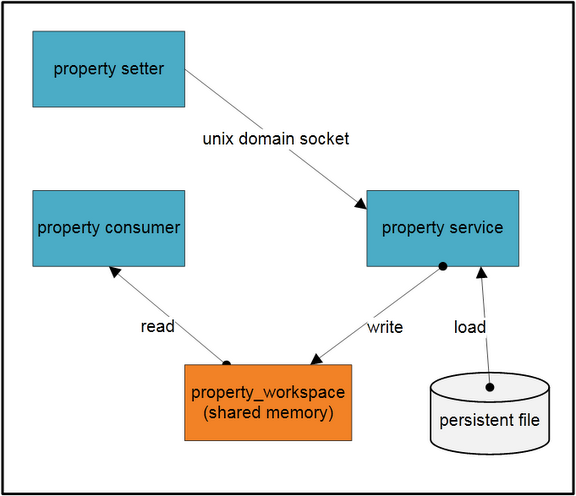
In the figure, there are three processes, a group of persistent property files and a shared memory block. The shared memory block is the container of all property records. Only the property service process can write to the shared memory block. It'll load property records from persistent the save them in the shared memory.
The consumer process loads the shared memory in its own virtual space and access properties directly. The setter process also loads the shared memory in its virtual space, but it can't write to the memory directly. When the setter tries to add or update a property, it sends the property to property service via unix domain socket. The property service will write the property to shared memory on behalf of the setter process, as well as to the persistent file.
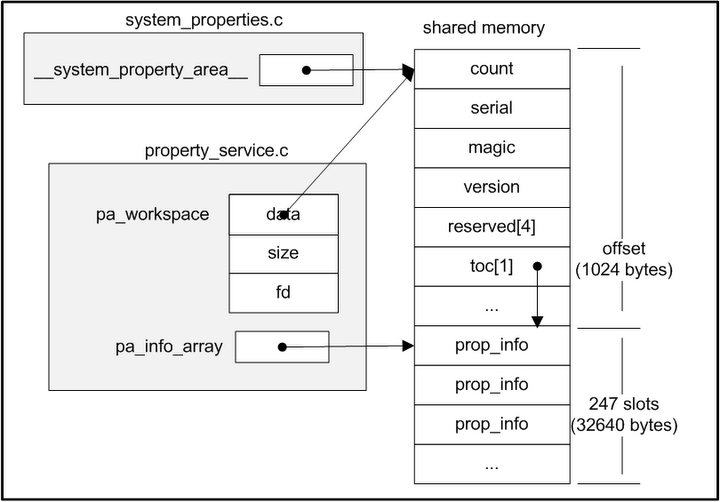
Property service runs inside init process. The init process first creates a shared memory region and stores a fd to the region. Then init process maps the region into its virtual space with mmap with MAP_SHARED flag, as a result, any updates to this area can be seen by all processes. This fd and region size are saved in a environment variable named "ANDROID_PROPERTY_WORKSPACE". Any other processes like consumer and setter will use this environment variable to get the fd and size, so that they can mmap this region into its own virtual space. The layout of the shared memory is shown below.
After that, init process will load properties from following files:
/default.prop
/system/build.prop
/system/default.prop
/data/local.prop
The next step is start property service. In this step, a unix domain socket server is created. This socket's pathname is "/dev/socket/property_service" which is well known to other client processes.
Finally, init process calls poll to wait for connect event on the socket.
On the consumer side, when it initializes libc(bionic/libc/bionic/libc_common.c __libc_init_common function). It will retrieve the fd and size from environment variable, and map the shared memory into its own space(bionic/libc/bionic/system_properties.c __system_properties_init function). After that, libcutils can read property just as normal memory for the consumer.
Currently, properties can't be removed. That's to say, once a property has been added, it can't be removed, neither can its key be changed.
How to get/set properties
There are three main means to get/set properies on android.
1. native code
When writing native applications, property_get and property_set APIs can be used to get/set properties. To use them, we need to include cutils/properties.h and link against libcutils.
2. java code
Android also provides System.getProperty and System.setProperty functions in java library, our java application can use them to get/set properties.
But it's important to note that although these java APIs are semantically equal to native version, java version store data in a totally different place. Actually, a hashtable is employed by dalvik VM to store properties. So, java properties are separated, it can't get or set native properties, and neither vice versa.
Update: Andrew mentioned that android.os.SystemProperties class can manipulate native properties, though it's intended for internal usage only. It calls through jni into native property library to get/set properties.
3. shell script
Android provides getprop and setprop command line tool to retrieve and update properties. They can be used in shell script. They are implemented on top of libcutils.
Update: Andrew mentioned that android.os.SystemProperties class can manipulate native properties, though it's intended for internal usage only. It calls through jni into native property library to get/set properties.
3. shell script
Android provides getprop and setprop command line tool to retrieve and update properties. They can be used in shell script. They are implemented on top of libcutils.


51 comments:
Thanks, for a very good explaination of android properties!!
You can get/set native properties in Java, although the API is undocumented. See android.os.SystemProperties
Any Java application can read system properties, but (if I remember correctly) you have to be running as the system server UID to set them.
andrew,
Thanks for your complementary information.
I didn't notice that internal java class can manipulate native properties.
Very good article. Am I right that the property system is not synchronous - so if I set a property and the read it immediately afterwards (or if another process read it immediately afterwards) then I might get the old value? If so, is there a blocking way to read or write properties?
The read and write operations to properties are guaranteed to be atomic through futex on android.
So, if the read operation really occurs (be scheduled) after the write operation, the consumer won't get the old value.
If you want to serialize the read and write operation as specific order in your own application, you need to use appropriate thread synchronization mechanisms.
Great detailed information, I ll be visiting you more frequently, here is very interesting information.
Thanks for sharing with us ...
public records
Very informative, great explanation of get and set. Is there anything like notify....Is there any way for native app to be notified of a specific property change....
I didn't see android property system support notification.
If it's a desired feature, you may implement your own notification. For example, the reader waits on a mutex until the writer notifies the mutex.
Hi All,
I am tryinng to update some system property using native API property_set through JNI.But the result is not getting updated .
Do i need to run my application using system server UID .If so, how it is done?
Hi andrew,
I am facing issue with setting system properties. when I issue setprop x 10 and then cross check with getprop x it is not displaying 10. otherway it is not setting system property.
What may be the reason for this? is it problem with shared memory size?
I'm not sure if andrew will come back to my blog and answer your question. So I'll try if I can help you.
I tested your command, it worked fine on my android virtual device. I was able to get x's value after it was set with setprop command.
Did you see any error message?
Did you modify/add any properties before issue "setprop x 10" ? On my android 2.2 virtual device, there are 132 existing properties. What about yours?
Hi rxwen,
I got some clue regarding this. If I try to comment some other system properties, then I can set the value. Is there any specific requirements to set/get system property. Does it depend on memory allocated to store system properties?
Thanks
Gururaja B O
What's the total number of properties on your system?
As you can see in the second diagram, there are 247 property slots available. If all slots are occupied, then new property can't be added.
Hi rxwen,
If I count total number of properties from getprop command it is showing 246.
is this count 247 is fixed or can we increase it?
Thanks
Gururaja B O
The max slots is defined as PA_COUNT_MAX in system\core\init\property_service.c.
You may change its value to a greater one.
But are you sure you need to store so much items as properties?
Why not consider other alternatives if property service isn't designed to store so much items?
Hi rxwen,
Thanks for the information. I increased the PA_COUNT_MAX and other macros. Now it is setting the system properties.
I dont know why so many system properties, since I can not delete them only way now is increasing the shared memory area.
Thanks
Gururaja
Hi thanks for the information but I am stuck up with the same error java unsatisfied link error while using this method in android.os.system properties.
How do I resolve it?
public static void set(String key, String val) {
....
native_set(key, val); // error here
}
hi lorry,
It seems the error is caused by not being able to find the native cutils lib for jni.
can you elaborate how do you make use of the systemproperties class?
Can you set a property using a kernel command line parameter?
Can anybody please explain to me why SystemProperties.set written in framework layer of Android can't work? (such as... AudioRecord.java) However, if I do SystemProperties.get in the same place, it can get the correct value, why's that? I did a search on the Android codes and found there's indeed no SystemProperties.set written in framework layer.
Please help me in understanding how the setprop code works?
Thanks for your document...
Thanks a lot. Its really helpful.
Property service refers a media that helps us to buy, sell, or getting rent the Houses,Flats, lands etc. This post is very helpful for people who has business relating to real estate. thanks
Estate Agents London
This is so nice. Thanks for sharing this great info. I appreciate this.
mass notifications
Guys, as an App, anyone of you knows how to get access to native system property? I found that libcutils.so is not part of the NDK...
Chuan-da HSIUNG,
You can achieve your requirement with jni. Please refer to my sample project here:
http://code.google.com/p/rxwen-blog-stuff/source/browse/trunk/android/read_system_property_with_jni/
Hello rxwen,
Great article...
I want to set native property from java? I tried but property is not updated !!
I am having following rights in manifest.xml
jrc
Hi JRC,
I believe the setter function is not exposed, so it can't be invoked from java through jni.
It's justified to hide this function from normal users. Since there are lots of critical settings in native property system, they are not supposed to be modified by user.
I would like to thank you for the efforts you have made in writing this article and i am hoping the same best work from you in the future as well.
Through the help of this content, I came aware with several advantages regarding albania property services which played an effective role in delivering the services of opting a dream house for us according to our preferences.
Great webpage brother I am about to notify this to all of my friends and contacts. Davie
This record is AMAZING! I love it, thank you so very much for giving us all a chance to listen to it. your collection is by far the best I have ever seen! Thanks again! online property tax record
Thank you.Very good descriptive
explanation of android properties!
you can use reflection where you invoke "set" method on "android.os.SystemProperties"
class
like this:
String methodName = "set";
String property = "property name";
String value = "property value";
Class clazz = Class.forName("android.os.SystemProperties");
Method m = clazz.getMethod(methodName, new Class[]{String.class, String.class});
m.invoke(null, property, value);
thank you again for information.
I would like to know the path or location of file where android stores the current (user changed) values of properties like brightness, volume, wifi APNs, etc...
What is file path where such properties are stored?
Those are android settings, not system props.
Use Setting.System, Settings.Global and Setting.Secure to read such settings. Only Settings.System can be changed by 3rd party applications.
Our mission is to providing tax maps, property record and parcel map in New Jersey you can download easily all type maps. Njland records Search website for more information.
Thank you very much for your explanation on System Properties.
I had verified in my non-rooted device, there is no file called system/default.prop as you said. I just need some information to disable the Services like Telephony, GPS, Sensors in android system as we are not needed them. Can you please let me know where do i need to make the changes so that they will be disabled entirely ?
Investment in land and building is most powerful strategy to invest money or utilization of savings in best manner. To make future life and convenient it is advised to save and invest in profitable business. Numerous opportunities for Corporate/ commercial investments are offered by Athar’s Marketing Network time to time considering the need of client and also following modern economical trends and tradition. This company provides best ever options in residential investment and commercial investments. In Pakistan, the emerging high quality business opportunities are available in Gwadar Property. Residential, commercial, small to large offices, industries and warehouses production options are available.
Hi guys,
Thank you so much for this wonderful article! Here we all can learn a lot of useful things and this is not only my opinion!
Even BLNCK corp. and http://www.metroplexhomes.com/ confirmed it!
in re broken link "cutils/properties.h" at android.git.kernel.org
see
https://android.googlesource.com/platform/system/core/+/master/libcutils/include/cutils/properties.h
Super bro...Lyrics translation
Nice bro.. well done
Click here for more lyrics om jai lakshmi mata
Your texts will shine with perfection if you use a punctuation corrector when creating them. The service is aimed at helping both in checking and in editing all errors in the text, thereby making it truly high-quality and beautiful. The result is definitely worth a couple of minutes of your attention.
Hello! As a student, I spent too much time checking the text and constantly made mistakes. If I had found this wonderful tool earlier, I would certainly have received much higher marks for my work. I also advise you not to spoil your text with mistakes and use this passive voice converter tool that will quickly and free of charge check your lines! >> persuasive in a sentence checker
sentence grammar checker is a great way to improve your text work, check them for grammatical errors. You can use it to check complex text works such as essays, literary works, plays and so on, as well as to check simple abstracts. The tool works with algorithms that identify errors and point them out
Even experienced copywriters can sometimes use the help of such a handy tool as capitalization corrector, which can not only check online but also correct all possible errors in your text, making it perfect! Isn't that cool? You simply have to try it in practice, so just follow the link and start working with all the possibilities that the world of modern technology provides.
Before delving into property ownership, it's crucial to understand the legal framework that governs foreign ownership of real estate in Pakistan.
At Attract Group, their commitment to quality assurance goes beyond ensuring bug-free software. They prioritize user satisfaction and strive to deliver flawless, intuitive products that exceed expectations. Their team of skilled QA professionals meticulously test every aspect of the software to guarantee optimal performance and reliability. With a customer-centric approach and a focus on continuous improvement, Attract Group's QA services stand out as a crucial element in providing top-notch digital solutions.
Post a Comment