In the previous post, native programming on android, I showed how to use code sourcery toolchain to do native programming on android. But in that way, we must link c library statically into our application, which is not desirable. So, in this post, I'll show how to do native programming with the android built-in building system.
For demonstration purpose, I'll create a logtest application. The application relies on cutils lib and writes some log information that can be examined through "adb logcat" command.
1. Initialize android source tree
In later steps, I'll use $ANDROID_SRC to refer to the root of the android source tree.
2. Create a directory for your application within the source tree
One advantage of android building system is it doesn't require your application to follow a specific organization structure. Your application can be placed in any directory. I created $ANDROID_SRC/logtest folder for the application.
3. Create an Android.mk file for the application in the directory
Android.mk is a reserved file name to indicate a module. This file describes how to build the module. By defining LOCAL_MODULE variable, we can assign a name to our application.
Depending on the type of the module, we include $(BUILD_EXECUTABLE), $(BUILD_DYNAMIC_LIBRARY) and $(BUILD_STATIC_LIBRARY) respectively at the end of the Android.mk.
4. Specify source files for the application
Through LOCAL_SRC_FILES variable, we specifies which source files are necessary to compile the module. Paths to source files are represented relative to the location of the Android.mk file.
5. Specify dependencies
Through LOCAL_SHARED_LIBRARIES variable, we can specify other libraries that our module depends on.
6. Build application
Go to root of Android source tree, and type make $(LOCAL_MODULE) to build the application which will be placed at $ANDROID_SRC/out/target/product/generic/system/bin/logtest.
Tips:
1. show commands
By default, android building system disables command echoing. It's hard to find out and correct dependency relationships without seeing the actual command. To change this behavior, we can append the showcommands pseudo target.
For example:
make logtest showcommands
2. quick build
Android building system need to find and parse Android.mk files within the source tree, and analysis dependencies. It's a time consuming task. In fact, there is a quicker way to build a module.
cd $ANDROID_SRC
source build/envsetup.sh
mmm {path_to_module_to_be_built} showcommands
3. build host module
Android building system can also used to generate modules for the host machine. An example is the adb application. To build host module, we can use:
include $(BUILD_HOST_EXECUTABLE) # $(BUILD_HOST_STATIC_LIBRARY)
4. disable prelink
We may encounter the error below while compiling a shared library:
build/tools/apriori/prelinkmap.c(168): library '***.so' not in prelink map
This is because android tries to prelink shared library with apriori tool by default, but our library isn't presented in the build/core/prelink-linux-arm.map. Thus the error. To get rid of it, we can add the line below in Android.mk to disable prelink.
LOCAL_PRELINK_MODULE := false
The demo can be found at:
http://code.google.com/p/rxwen-blog-stuff/source/browse/trunk/android/logtest/
Reference:
Android Building System
Android build system
Monday, February 1, 2010


Wednesday, January 20, 2010
windbg sos.dll version issue
| I debugged a .net 1.1 based windows application which exits silently upon start up. The problem itself is trivial and not worth mentioning. What I want to say is there is a subtle point about sos.dll version. When I was debugging, I started the application under windbg. Then issue ".loadby sos mscorwks" command to load sos.dll extension corresponds to the running .net framework. And I entered !DumpAllExceptions command which should exist in sos.dll for .net framework 1.1, but ended in not finding this command: No export DumpAllExceptions found Finally, I had to use "!DumpHeap -type Exception" to find out all exceptions. Having done some investigation, I found there are two sos.dll files for .net 1.1. One in .net framework installation folder, and one in windbg installation folder. The latter one is a full featured extension and support DumpAllExceptions command. I tried debugging the application again with sos.dll comes with windbg by issusing: ".load windbg_installation_folder/clr10/sos.dll". This time, DumpAllExceptions was back to life and worked like a charm. BTW, an alternative way to do !DumpAllExceptions is to take advantage of .foreach command. .foreach(exception {!DumpHeap -type Exception -short}) {!do exception; .echo print exception done !!! *****************} For convenience, below are commands supported by different version sos.dll. C:\WINDOWS\Microsoft.NET\Framework\v1.1.4322\SOS.dll 0:000> !help SOS : Help COMState | List COM state for each thread ClrStack | Provides true managed stack trace, source and line numbers. Additional parameters: -p[arams] -l[ocals] -r[egs] -a[ll]. DumpClass DumpDomain [ DumpHeap [-stat] [-min 100] [-max 2000] [-mt 0x3000000] [-type DumpMD DumpMT [-MD] DumpModule DumpObj DumpStack [-EE] [-smart] [top stack [bottom stack] | -EE only shows managed stack items. DumpStackObjects [top stack [bottom stack] DumpVC EEHeap [-gc] [-win32] [-loader] | List GC/Loader heap info EEStack [-short] [-EE] | List all stacks EE knows EEVersion | List mscoree.dll version FinalizeQueue [-detail] | Work queue for finalize thread GCInfo [ GCRoot IP2MD Name2EE ObjSize [ ProcInfo [-env] [-time] [-mem] | Display the process info RWLock [-all] SyncBlk [-all|#] | List syncblock ThreadPool | Display CLR threadpool state Threads | List managed threads Token2EE u [ {windbg installation folder}\clr10\sos.dll 0:000> !help Did you know that a lot of exceptions (!dumpallexceptions) can cause memory problems. To see more tips, run !tip. ------------------------------------------------------------------------------- SOS is a debugger extension DLL designed to aid in the debugging of managed programs. Functions are listed by category, then roughly in order of importance. Shortcut names for popular functions are listed in parenthesis. Type "!help Object Inspection Examining code and stacks ----------------------------- ----------------------------- DumpObj (do) Threads (t) DumpAllExceptions (dae) CLRStack DumpStackObjects (dso) IP2MD DumpHeap (dh) U DumpVC DumpStack GCRoot EEStack ObjSize GCInfo FinalizeQueue COMState DumpDynamicAssemblies (dda) X DumpField (df) SearchStack TraverseHeap (th) GCRef Examining CLR data structures Diagnostic Utilities ----------------------------- ----------------------------- DumpDomain VerifyHeap (vh) EEHeap DumpLog Name2EE FindAppDomain SyncBlk SaveModule DumpASPNETCache (dac) SaveAllModules (sam) DumpMT GCHandles DumpClass GCHandleLeaks DumpMD FindDebugTrue Token2EE FindDebugModules EEVersion Bp DumpSig ProcInfo DumpModule StopOnException (soe) ThreadPool (tp) TD ConvertTicksToDate (ctd) Analysis ConvertVTDateToDate (cvtdd) Bl RWLock CheckCurrentException (cce) DumpConfig CurrentExceptionName (cen) DumpHttpRuntime ExceptionBp DumpSessionStateConfig FindTable DumpBuckets LoadCache DumpHistoryTable SaveCache DumpRequestTable ASPXPages DumpCollection (dc) DumpGCNotInProgress DumpDataTables CLRUsage GetWorkItems DumpLargeObjectSegments (dl) DumpModule DumpAssembly Other DumpMethodSig ----------------------------- DumpRuntimeTypes FAQ PrintIPAddress DumpHttpContext DumpXmlDocument (dxd) C:\WINDOWS\Microsoft.NET\Framework\v2.0.50727\SOS.dll 0:000> !help ------------------------------------------------------------------------------- SOS is a debugger extension DLL designed to aid in the debugging of managed programs. Functions are listed by category, then roughly in order of importance. Shortcut names for popular functions are listed in parenthesis. Type "!help Object Inspection Examining code and stacks ----------------------------- ----------------------------- DumpObj (do) Threads DumpArray (da) CLRStack DumpStackObjects (dso) IP2MD DumpHeap U DumpVC DumpStack GCRoot EEStack ObjSize GCInfo FinalizeQueue EHInfo PrintException (pe) COMState TraverseHeap BPMD Examining CLR data structures Diagnostic Utilities ----------------------------- ----------------------------- DumpDomain VerifyHeap EEHeap DumpLog Name2EE FindAppDomain SyncBlk SaveModule DumpMT GCHandles DumpClass GCHandleLeaks DumpMD VMMap Token2EE VMStat EEVersion ProcInfo DumpModule StopOnException (soe) ThreadPool MinidumpMode DumpAssembly DumpMethodSig Other DumpRuntimeTypes ----------------------------- DumpSig FAQ RCWCleanupList DumpIL | |
Ex 15.4-5 of introduction to algorithms
Question:
Give an O(n squared)-time algorithm to find the longest monotonically increasing subsequence of a sequence of n numbers.
Answer:
A brute-force approach is enumerate all subsequences of the n numbers and find out a monotonically increasing one with the longest length. This algorithm has a poor exponential running time.
This problem exhibit optimal substructure and overlapping subproblems properties, and is suited for dynamic programming.
Let A denotes the array of n numbers, A[i] is the ith number of the array.
Let P{i,j} denotes problem of finding the longest monotonically increasing subsequence. So the original problem is P{1,n}.
Let S(i,j) denotes the length of longest subsequence of P{i,j}.
Let M(i,j) denotes the largest number in the longest subsequence of P{i,j}. Note for P{i,j}, there may exist several subsequence has the same longest length, M(i,j) should be the smallest one of them.
For P{1,j}, if A[j] is larger than M(1,j-1), then S(1,j) equals S(1,j-1) plus 1. Otherwise, it equals S(1,j-1).
So, we have:
S(1,j) = S(1,j-1) if A[j] <> M[1,j-1]
The complicated thing in this procedure is how to maintain M's value correctly. The idea is if A[j] is larger than M(1,j-1), M(1,j) should be A[j]. If A[j] is smaller than M(1,j-1), M(1,j) should either be M(1,j-1) or A[j] if A[j] is larger than M(1,x) where S(1,x) is less than S(1,j-1).
This equation yields a n squared running time algorithm.
Give an O(n squared)-time algorithm to find the longest monotonically increasing subsequence of a sequence of n numbers.
Answer:
A brute-force approach is enumerate all subsequences of the n numbers and find out a monotonically increasing one with the longest length. This algorithm has a poor exponential running time.
This problem exhibit optimal substructure and overlapping subproblems properties, and is suited for dynamic programming.
Let A denotes the array of n numbers, A[i] is the ith number of the array.
Let P{i,j} denotes problem of finding the longest monotonically increasing subsequence. So the original problem is P{1,n}.
Let S(i,j) denotes the length of longest subsequence of P{i,j}.
Let M(i,j) denotes the largest number in the longest subsequence of P{i,j}. Note for P{i,j}, there may exist several subsequence has the same longest length, M(i,j) should be the smallest one of them.
For P{1,j}, if A[j] is larger than M(1,j-1), then S(1,j) equals S(1,j-1) plus 1. Otherwise, it equals S(1,j-1).
So, we have:
S(1,j) = S(1,j-1) if A[j] <> M[1,j-1]
The complicated thing in this procedure is how to maintain M's value correctly. The idea is if A[j] is larger than M(1,j-1), M(1,j) should be A[j]. If A[j] is smaller than M(1,j-1), M(1,j) should either be M(1,j-1) or A[j] if A[j] is larger than M(1,x) where S(1,x) is less than S(1,j-1).
This equation yields a n squared running time algorithm.
Correction:
Having done some tests, the preceding algorithm failed for this case: "8 9 1 2 3 4".
The recursion can be performed another way. Let S(i) denotes the length of the longest subsequence that ended with item A(i). So, the relationship between a problem and its subproblem can be expressed as:
S(i) = max{ S(k)+1 } (k is between 0 and i -1) that all k satisfies A[k] is less than A[i]
And the final result is the largest one of array S.
Source code for this solution is here:
http://code.google.com/p/rxwen-blog-stuff/source/browse/trunk/algorithm/i2a_ex_15.4-5/ex15_4_5.cpp
Wednesday, January 13, 2010
google against GFW
I keep using blogger.com because I was hoping it will not be banned by the GFW some day.
But, according to this, a new approach to china, it seems it's becoming less likely blogger.com will be unbanned. And things may become worse in china, more and more google services may be affected.
To some extent, I'm glad to see google can hold its motto "Don't be evil" firmly and stand out to fight against such extreme information blocking. But, it's hard to show full support to this action considering its consequence for google & chinese people. Just wait and see how chinese gov will response.
Update on March 23, 2010:
Finally, it happens: A new approach to China: an update. Applaud for you, google!
But, according to this, a new approach to china, it seems it's becoming less likely blogger.com will be unbanned. And things may become worse in china, more and more google services may be affected.
To some extent, I'm glad to see google can hold its motto "Don't be evil" firmly and stand out to fight against such extreme information blocking. But, it's hard to show full support to this action considering its consequence for google & chinese people. Just wait and see how chinese gov will response.
Update on March 23, 2010:
Finally, it happens: A new approach to China: an update. Applaud for you, google!
Sunday, January 10, 2010
fix "no module named readline" on windows
I tried to download android source code by following instructions in this article: Using Repo and Git. Because I'm working with cygwin on windows, the readline module isn't available. The repo script failed to run and compained "no module named readline".
Luckily, the Ipython project provides an alternative readline module named pyreadline that can be used on windows and mac osx.
To install it:
1. Download pyreadline for windows.
2. unzip the setup file.
3. Copy PURELIB/readline.py and PURELIB/pyreadline to $(python_installation_folder)/Lib
After it's done, the repo script can run successfully.
Update: In order not to get the python installation folder polluted, we can create a directory for all manually installed python modules. And set PYTHONPATH environment variable to this directory so that modules installed here can be loaded.
Luckily, the Ipython project provides an alternative readline module named pyreadline that can be used on windows and mac osx.
To install it:
1. Download pyreadline for windows.
2. unzip the setup file.
3. Copy PURELIB/readline.py and PURELIB/pyreadline to $(python_installation_folder)/Lib
After it's done, the repo script can run successfully.
Update: In order not to get the python installation folder polluted, we can create a directory for all manually installed python modules. And set PYTHONPATH environment variable to this directory so that modules installed here can be loaded.
Saturday, January 9, 2010
remove visual sourcesafe binding
I need to change a visual stuio 2003 project's source control system from visual sourcesafe to subversion. In order to commit clean source files to svn, I first need to completely remove vss binding from the project.
There are a lot of articles about how to do this, I was following this one: Removing a Solution from Sourcesafe. But the problem is the project is comprised of two solutions, each with a bunch of projects. It's tedious to manually edit them manually. So, I managed to do this with following commands. These commands are available in cygwin on windows.
1. remove vss files
find ./ -name "*scc" | xargs rm
Explaination: this command uses find to get all files whose name end in "scc", then pipes the list to xargs. xargs will format the list in acceptable format and invoke rm to delete them.
There is a utility also named find on windows. In order to make sure the gnu find is invoked, I arranges the PATH environment variable so that the cygwin/bin folder precedes C:\windows\system32.
2. remove vss information in project files
find ./ -name "*.csproj" -exec sed -i '/Scc/ d'
Explaination: this command finds all files whose extension are ".csproj", and execute " sed -i '/Scc/ d' " on each file found. sed is a stream editor. This sed command searches for lines that have Scc and delete them. And the -i argument tells sed to edit file in place, so that the project gets updated.
3. restore file permission
find ./ -name "*.csproj" -exec chmod +rw {} ;
Explanation: after sed modifies a file, I lose all permission on that file. So I need to restore file permission with chmod. There is also a windows command line utility cacls can do this. And cacls can be a better choice here since microsoft internal tool may set file permission more properly than chmod.
There are a lot of articles about how to do this, I was following this one: Removing a Solution from Sourcesafe. But the problem is the project is comprised of two solutions, each with a bunch of projects. It's tedious to manually edit them manually. So, I managed to do this with following commands. These commands are available in cygwin on windows.
1. remove vss files
find ./ -name "*scc" | xargs rm
Explaination: this command uses find to get all files whose name end in "scc", then pipes the list to xargs. xargs will format the list in acceptable format and invoke rm to delete them.
There is a utility also named find on windows. In order to make sure the gnu find is invoked, I arranges the PATH environment variable so that the cygwin/bin folder precedes C:\windows\system32.
2. remove vss information in project files
find ./ -name "*.csproj" -exec sed -i '/Scc/ d'
Explaination: this command finds all files whose extension are ".csproj", and execute " sed -i '/Scc/ d' " on each file found. sed is a stream editor. This sed command searches for lines that have Scc and delete them. And the -i argument tells sed to edit file in place, so that the project gets updated.
3. restore file permission
find ./ -name "*.csproj" -exec chmod +rw {} ;
Explanation: after sed modifies a file, I lose all permission on that file. So I need to restore file permission with chmod. There is also a windows command line utility cacls can do this. And cacls can be a better choice here since microsoft internal tool may set file permission more properly than chmod.
Thursday, January 7, 2010
android property system
Property system is an important feature on android. It runs as a service and manages system configurations and status. All these configurations and status are properties. A property is a key/value pair, both of which are of string type.
From the sense of function, it's very similar to windows registry. Many android applications and libraries directly or indirectly relies on this feature to determine their runtime behavior. For example, adbd process queries property service to check if it's running in emulator. Another example is the java.io.File.pathSeparator returns the value stored in property service.
How property system works
The high level architecture of property system is shown as following.
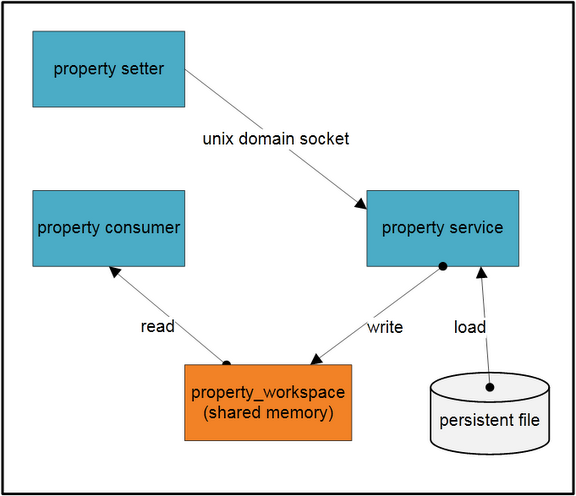
In the figure, there are three processes, a group of persistent property files and a shared memory block. The shared memory block is the container of all property records. Only the property service process can write to the shared memory block. It'll load property records from persistent the save them in the shared memory.
The consumer process loads the shared memory in its own virtual space and access properties directly. The setter process also loads the shared memory in its virtual space, but it can't write to the memory directly. When the setter tries to add or update a property, it sends the property to property service via unix domain socket. The property service will write the property to shared memory on behalf of the setter process, as well as to the persistent file.
Property service runs inside init process. The init process first creates a shared memory region and stores a fd to the region. Then init process maps the region into its virtual space with mmap with MAP_SHARED flag, as a result, any updates to this area can be seen by all processes. This fd and region size are saved in a environment variable named "ANDROID_PROPERTY_WORKSPACE". Any other processes like consumer and setter will use this environment variable to get the fd and size, so that they can mmap this region into its own virtual space. The layout of the shared memory is shown below.
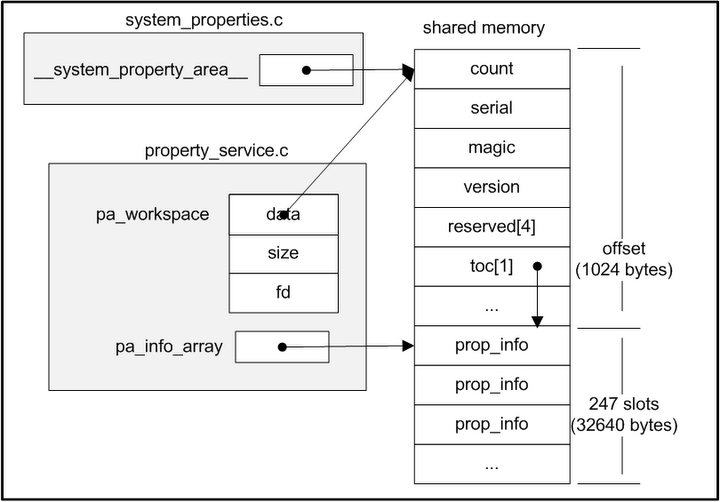
After that, init process will load properties from following files:
/default.prop
/system/build.prop
/system/default.prop
/data/local.prop
The next step is start property service. In this step, a unix domain socket server is created. This socket's pathname is "/dev/socket/property_service" which is well known to other client processes.
Finally, init process calls poll to wait for connect event on the socket.
On the consumer side, when it initializes libc(bionic/libc/bionic/libc_common.c __libc_init_common function). It will retrieve the fd and size from environment variable, and map the shared memory into its own space(bionic/libc/bionic/system_properties.c __system_properties_init function). After that, libcutils can read property just as normal memory for the consumer.
Currently, properties can't be removed. That's to say, once a property has been added, it can't be removed, neither can its key be changed.
How to get/set properties
There are three main means to get/set properies on android.
1. native code
When writing native applications, property_get and property_set APIs can be used to get/set properties. To use them, we need to include cutils/properties.h and link against libcutils.
2. java code
Android also provides System.getProperty and System.setProperty functions in java library, our java application can use them to get/set properties.
From the sense of function, it's very similar to windows registry. Many android applications and libraries directly or indirectly relies on this feature to determine their runtime behavior. For example, adbd process queries property service to check if it's running in emulator. Another example is the java.io.File.pathSeparator returns the value stored in property service.
How property system works
The high level architecture of property system is shown as following.
In the figure, there are three processes, a group of persistent property files and a shared memory block. The shared memory block is the container of all property records. Only the property service process can write to the shared memory block. It'll load property records from persistent the save them in the shared memory.
The consumer process loads the shared memory in its own virtual space and access properties directly. The setter process also loads the shared memory in its virtual space, but it can't write to the memory directly. When the setter tries to add or update a property, it sends the property to property service via unix domain socket. The property service will write the property to shared memory on behalf of the setter process, as well as to the persistent file.
Property service runs inside init process. The init process first creates a shared memory region and stores a fd to the region. Then init process maps the region into its virtual space with mmap with MAP_SHARED flag, as a result, any updates to this area can be seen by all processes. This fd and region size are saved in a environment variable named "ANDROID_PROPERTY_WORKSPACE". Any other processes like consumer and setter will use this environment variable to get the fd and size, so that they can mmap this region into its own virtual space. The layout of the shared memory is shown below.
After that, init process will load properties from following files:
/default.prop
/system/build.prop
/system/default.prop
/data/local.prop
The next step is start property service. In this step, a unix domain socket server is created. This socket's pathname is "/dev/socket/property_service" which is well known to other client processes.
Finally, init process calls poll to wait for connect event on the socket.
On the consumer side, when it initializes libc(bionic/libc/bionic/libc_common.c __libc_init_common function). It will retrieve the fd and size from environment variable, and map the shared memory into its own space(bionic/libc/bionic/system_properties.c __system_properties_init function). After that, libcutils can read property just as normal memory for the consumer.
Currently, properties can't be removed. That's to say, once a property has been added, it can't be removed, neither can its key be changed.
How to get/set properties
There are three main means to get/set properies on android.
1. native code
When writing native applications, property_get and property_set APIs can be used to get/set properties. To use them, we need to include cutils/properties.h and link against libcutils.
2. java code
Android also provides System.getProperty and System.setProperty functions in java library, our java application can use them to get/set properties.
But it's important to note that although these java APIs are semantically equal to native version, java version store data in a totally different place. Actually, a hashtable is employed by dalvik VM to store properties. So, java properties are separated, it can't get or set native properties, and neither vice versa.
Update: Andrew mentioned that android.os.SystemProperties class can manipulate native properties, though it's intended for internal usage only. It calls through jni into native property library to get/set properties.
3. shell script
Android provides getprop and setprop command line tool to retrieve and update properties. They can be used in shell script. They are implemented on top of libcutils.
Update: Andrew mentioned that android.os.SystemProperties class can manipulate native properties, though it's intended for internal usage only. It calls through jni into native property library to get/set properties.
3. shell script
Android provides getprop and setprop command line tool to retrieve and update properties. They can be used in shell script. They are implemented on top of libcutils.
Monday, January 4, 2010
understanding the android media framework
android media framework is built on top of a set of media libraries, including OpenCORE, vorbis and sonivox. So one of goal of android media framework is to provide a consistent interface for all services provided by underlying libraries and make them transparent to users.
The figure below shows the dependency relationships between libraries of the media framework.
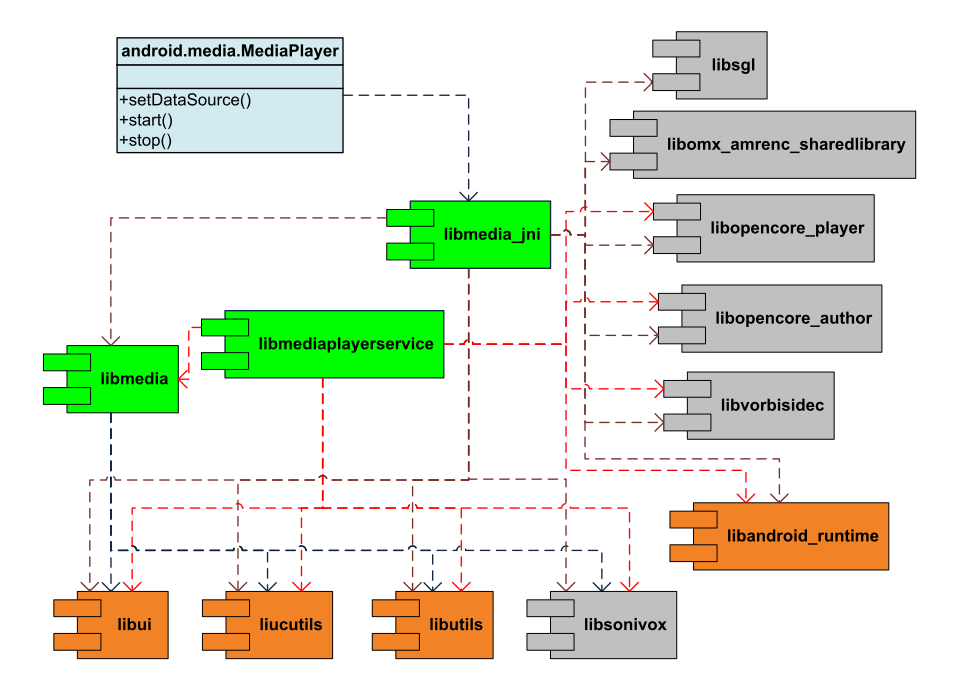
The core of the media framework is composed of libmedia, libmediaplayerservice and libmedia_jni. Their codes reside in frameworks/base/media folder.
libmedia defines the inheritance hierarchy and base interfaces. It’s the base library.
libmedia_jni is the shim between java application and native library. First, it implements the JNI specification so that it can be used by java application. Second, it implements the facade pattern for the convenience of caller.
libmediaplayerservice implements some of concrete players and the media service which will manage player instances.
The figure below shows the class hierarchy.
Note the BpInterface and BnInterface are template classes. Any instantiation of them also inherit the template argument INTERFACE as well.
In the class hierarchy diagram, though listed as a separate module, binder is actually implemented inside libutils component whose source code locate at /frameworks/base/libs/utils folder.
An interesting thing to note is in android, the application that intends to show the media content and the player that actually renders the media content run in different process. The red line in the sequence diagram below shows the boundary of two processes.

The figure shows three most common operations, creating a new player, setting datasource and playing. The last MediaPlayerBase object is the interface that MediaPlayerService::Client object uses to refer to the concrete player instance. The concrete player can be VorbisPlayer, PVPlayer, or any other player, depending on the type of the media to be played.
When an application creates a android.media.MediaPlayer object, it’s actually holding a proxy which can be used to manipulate the concrete player resides in the mediaserver process. During the whole procedure, two process communicates with Binder IPC mechanism.
Having knowledge above, it’s not difficult to understand why MediaPlayer doesn’t provide an API to use memory stream as source. Because the memory manipulated by the stream is in the address space of the application, and it’s not directly accessible by the mediaserver process.
References:
Thursday, December 24, 2009
Ex 10.4-3 of introduction to algorithms
Question:
Write an O(n)-time nonrecursive procedure that, given an n-node binary tree, prints out the key of each node in the tree. Use a stack as an auxiliary data structure.
Answer:
This isn't a difficult question. But the skill of turning a recursive algorithm to non-recursive algorithm is so important, it worths a blog post.
The data structure for tree node used in this post is defined as:
class TreeNode
{
public:
int value;
TreeNode* left; // left child node
TreeNode* right; // right child node
}
The simplest and cleanest algorithm for binary tree traversal is the recursion. As shown below:
void inOrderTraversalRecursive(TreeNode* node)
{
if(Null == node)
return;
inOrderTraversalRecursive(node->left); // visit left sub-tree first
visit(node); // visit current node
inOrderTraversalRecursive(node->right); // visit right sub-tree
}
In this algorithm, each time we goes down a level to the calling stack, a new stack frame will be created for the new function call. Then the context changes to the new stack frame. And the node is kept on the previous stack frame. In current stack frame, node is the left or right child of last stack frame's node. With the help of stack, after a function call is finished, the context changes back to the previous stack frame and consequently gets back to the parent node. Because this stack is managed automatically be the compiler, this algorithm becomes so simple. But this stack isn't unlimited, if the tree's height is large enough, the stack may exhaust. In order to get over this limit, we can use a heap (whose limit is far larger.) based stack data structure and manage it ourselves.
This is done in a loop. Each iteration of the loop is regarded as a function call in recursive version. At proper point of the iteration, we must push/pop node from/to stack so that the context of the iteration can be maintained.
In recursive version, if node is not null, we need to save current node in stack (push) and change node to node->left. Otherwise, the function call returns right away, which means the node is restored (pop) to the value in last call stack frame. After the left sub-tree has been visited, we visit current node.
Then we save (push) current node again and change node to node->right to visit right sub-tree. After it's done, we need to restore (pop) node. But as we can see in the recursive version, the node isn't used at all after the right sub-tree has been visited. That's to say, it's not necessary to save context before we visit right sub-tree any more. This procedure can be omitted in this case.
The last thing to determine is the termination condition. In what situation can we terminate the loop? First, it's clear that the stack should be empty when the loop terminates. But this isn't enough, the node should be null as well to terminate the loop.
void inOrderTraversalStack(TreeNode* root)
{
typedef std::stack<TreeNode*> TreeStack;
TreeStack stack;
TreeNode *node = root;
while(NULL != node || !stack.empty())
{
if(NULL != node)
{
stack.push(node);
node = node->left;
}
else
{
node = stack.top();
stack.pop();
visit(node);
node = node->right;
}
}
}
Write an O(n)-time nonrecursive procedure that, given an n-node binary tree, prints out the key of each node in the tree. Use a stack as an auxiliary data structure.
Answer:
This isn't a difficult question. But the skill of turning a recursive algorithm to non-recursive algorithm is so important, it worths a blog post.
The data structure for tree node used in this post is defined as:
class TreeNode
{
public:
int value;
TreeNode* left; // left child node
TreeNode* right; // right child node
}
The simplest and cleanest algorithm for binary tree traversal is the recursion. As shown below:
void inOrderTraversalRecursive(TreeNode* node)
{
if(Null == node)
return;
inOrderTraversalRecursive(node->left); // visit left sub-tree first
visit(node); // visit current node
inOrderTraversalRecursive(node->right); // visit right sub-tree
}
In this algorithm, each time we goes down a level to the calling stack, a new stack frame will be created for the new function call. Then the context changes to the new stack frame. And the node is kept on the previous stack frame. In current stack frame, node is the left or right child of last stack frame's node. With the help of stack, after a function call is finished, the context changes back to the previous stack frame and consequently gets back to the parent node. Because this stack is managed automatically be the compiler, this algorithm becomes so simple. But this stack isn't unlimited, if the tree's height is large enough, the stack may exhaust. In order to get over this limit, we can use a heap (whose limit is far larger.) based stack data structure and manage it ourselves.
This is done in a loop. Each iteration of the loop is regarded as a function call in recursive version. At proper point of the iteration, we must push/pop node from/to stack so that the context of the iteration can be maintained.
In recursive version, if node is not null, we need to save current node in stack (push) and change node to node->left. Otherwise, the function call returns right away, which means the node is restored (pop) to the value in last call stack frame. After the left sub-tree has been visited, we visit current node.
Then we save (push) current node again and change node to node->right to visit right sub-tree. After it's done, we need to restore (pop) node. But as we can see in the recursive version, the node isn't used at all after the right sub-tree has been visited. That's to say, it's not necessary to save context before we visit right sub-tree any more. This procedure can be omitted in this case.
The last thing to determine is the termination condition. In what situation can we terminate the loop? First, it's clear that the stack should be empty when the loop terminates. But this isn't enough, the node should be null as well to terminate the loop.
void inOrderTraversalStack(TreeNode* root)
{
typedef std::stack<TreeNode*> TreeStack;
TreeStack stack;
TreeNode *node = root;
while(NULL != node || !stack.empty())
{
if(NULL != node)
{
stack.push(node);
node = node->left;
}
else
{
node = stack.top();
stack.pop();
visit(node);
node = node->right;
}
}
}
Thursday, December 17, 2009
Ex 9.3-8 of Introduction to algorithms
Question:
Let X[1 .. n] and Y [1 .. n] be two arrays, each containing n numbers already in sorted order. Give an O(lg n)-time algorithm to find the median of all 2n elements in arrays X and Y.
Answer:
Without losing generality, suppose the median z is the smaller median (there are two medians since total number is even), it's the ith element in array X. In array X, there are i-1 numbers smaller than z and n-i numbers larger than the z. Because z is the median of all 2n elements, there should be n-i numbers in Y smaller than z and i numbers larger than z.
In order to find out z, we first compare the median of X and Y. Say they are mx and my respectively. If mx is smaller than my, we compare mx and the largest element in Y that is smaller than my, say it's my2. If mx is larger than my2, then mx is z, the median of all 2n elements. Otherwise, z must be in higher half of X or lower half of Y. So, we can perform preceding logic recursively.
This algorithm works just like binary search tree whose running time is O(lg n).
The code for the algorithm is available at:
http://code.google.com/p/rxwen-blog-stuff/source/browse/trunk/algorithm/i2a_ex_9.3-8/ex9_3_8.cpp
Let X[1 .. n] and Y [1 .. n] be two arrays, each containing n numbers already in sorted order. Give an O(lg n)-time algorithm to find the median of all 2n elements in arrays X and Y.
Answer:
Without losing generality, suppose the median z is the smaller median (there are two medians since total number is even), it's the ith element in array X. In array X, there are i-1 numbers smaller than z and n-i numbers larger than the z. Because z is the median of all 2n elements, there should be n-i numbers in Y smaller than z and i numbers larger than z.
In order to find out z, we first compare the median of X and Y. Say they are mx and my respectively. If mx is smaller than my, we compare mx and the largest element in Y that is smaller than my, say it's my2. If mx is larger than my2, then mx is z, the median of all 2n elements. Otherwise, z must be in higher half of X or lower half of Y. So, we can perform preceding logic recursively.
This algorithm works just like binary search tree whose running time is O(lg n).
The code for the algorithm is available at:
http://code.google.com/p/rxwen-blog-stuff/source/browse/trunk/algorithm/i2a_ex_9.3-8/ex9_3_8.cpp
Friday, December 11, 2009
use memcmp to compare objects?
I came across a question regarding c++, is it more efficient to use memcmp to determine equality of two objects of the same type.
This is not a question regarding efficiency at all, it's about correctness. Using memcmp to compare two objects MAY be correct sometimes, but it really depends on several factors:
We know many compiler will align a class's members to word size for better performance, because it's harder to read or write memories at arbitrary location. So possibly, there are gaps (unused memories) between fields.
Those gaps are occupied by objects of the class, but are note directly managed through objects. The contents of these gaps are undefined. They may be what's left over since their last usage. Or they might be cleared/filled by a diligent compiler.
When you use memcmp to compare two objects, these gaps which has random bits are also taken into considertion. But this is undesired behavior and leads to uncertainty.
So, never do this unless you're 100% sure about the memory layout, compiler behavior, and you really don't care portability, and you really want to gain the efficiency.
The demo below shall show using memcmp doesn't work correctly with microsoft's c++ compiler v15.00.30729.01 and gcc v4.4.1.
This is not a question regarding efficiency at all, it's about correctness. Using memcmp to compare two objects MAY be correct sometimes, but it really depends on several factors:
- Class alignment
- Compiler implementation
- Compiler configuration
We know many compiler will align a class's members to word size for better performance, because it's harder to read or write memories at arbitrary location. So possibly, there are gaps (unused memories) between fields.
Those gaps are occupied by objects of the class, but are note directly managed through objects. The contents of these gaps are undefined. They may be what's left over since their last usage. Or they might be cleared/filled by a diligent compiler.
When you use memcmp to compare two objects, these gaps which has random bits are also taken into considertion. But this is undesired behavior and leads to uncertainty.
So, never do this unless you're 100% sure about the memory layout, compiler behavior, and you really don't care portability, and you really want to gain the efficiency.
The demo below shall show using memcmp doesn't work correctly with microsoft's c++ compiler v15.00.30729.01 and gcc v4.4.1.
#include "string.h"
// ==================================
//        Class:  Foo
//  Description:
// ==================================
class Foo
{
  public:
      Foo (): a(0), b(0), c(0){
      };   // constructor
      int a;
      char b;
      int c;

}; // -----  end of class Foo  -----

void shuffle_stack()
{
  Foo f1;
  Foo f2;

  *((int*)(&f1.b)) = 0x87654321;
  *((int*)(&f2.b)) = 0x12345678;
}

int compare()
{
  Foo f1;
  Foo f2;

  return memcmp((void*)(&f1), (void*)(&f2), sizeof(Foo));
}

int main ( int argc, char *argv[] )
{
  int rc = 0;
  shuffle_stack();
  rc = compare();
  return 0;
} // ----------  end of function main  ----------
Wednesday, December 9, 2009
communicate with service on android
While doing android programming, it's a common sense to use Activity to interact with users and use Service to perform time consuming tasks (actually, such tasks are usually performed on a new thread spawned by the service). A classic example is media player. It's composed of several Activities and a playing-back Service. Through Activities, users can pick a media file to play, or control (start, pause, fast forward, set volume, etc) the playing-back Service. And the Service is responsible for playing the media file. The service can run in background even no Activity of the player application is active. It's also possible that the Service is implemented and hosted in another application other than the one where Activities are implemented.
In order to allow Activities to control the behavior of the Service, there should be an mechanism to allow they talk to each other. And by following the Process Agnostic feature of Android platform, this communication mechanism should also be able to handle Inter-Process and Inside-Process communication consistently. Such that from the upper layer application code's point of view, it's making communications between components independent of which process these components run in.
Luckily, Android has already provided such a RPC mechanism which has been briefly introduced here: Android application fundamentails - remote procedure calls. And the document Designing a Remote Interface Using AIDL also shows a tutorial about how to perform RPC.
But the documents above don't include a complete yet simple example for us to follow, so I'd like to explore how to do Inside-Process as well as Inter-Process with an example.
This example is composed of two applications. The first application (app1) will bind to a service runs in another application (app2) when a button is clicked, thus demonstrates Inter-Process communication. app2 can bind to the service too, which demonstrates Inside-Process communication.
There are two buttons on each application's Activity. First, you need to click button titled start svc to bind to service and get a reference to Binder object. Then, you can click button titled call rpc to invoke a method in service.
It's trivial to repeat the tutorial of designing remote interface. So I'd like to just post some findings during my exploration.
Source Code
browse code here:
http://code.google.com/p/rxwen-blog-stuff/source/browse/#svn/trunk/android/rpc-with-service
or via command:
svn co https://rxwen-blog-stuff.googlecode.com/svn/trunk/android/rpc-with-service
In order to allow Activities to control the behavior of the Service, there should be an mechanism to allow they talk to each other. And by following the Process Agnostic feature of Android platform, this communication mechanism should also be able to handle Inter-Process and Inside-Process communication consistently. Such that from the upper layer application code's point of view, it's making communications between components independent of which process these components run in.
Luckily, Android has already provided such a RPC mechanism which has been briefly introduced here: Android application fundamentails - remote procedure calls. And the document Designing a Remote Interface Using AIDL also shows a tutorial about how to perform RPC.
But the documents above don't include a complete yet simple example for us to follow, so I'd like to explore how to do Inside-Process as well as Inter-Process with an example.
This example is composed of two applications. The first application (app1) will bind to a service runs in another application (app2) when a button is clicked, thus demonstrates Inter-Process communication. app2 can bind to the service too, which demonstrates Inside-Process communication.
There are two buttons on each application's Activity. First, you need to click button titled start svc to bind to service and get a reference to Binder object. Then, you can click button titled call rpc to invoke a method in service.
It's trivial to repeat the tutorial of designing remote interface. So I'd like to just post some findings during my exploration.
- The onBind method of service should return a non-null IBinder. Otherwise, the callback function onServiceConnected won't be fired.
- Add two aidl interface with the same name to both projects (ISvcController.aidl in our example). And the interface can be used in both projects to manipulate the IBinder object returned by the service. These two interfaces can have different member functions, but any function to be used must have the same signature and be placed at the same place (index) in these interfaces.
- When access the service in the same process, the original IBinder returned in onBind method is passed to onServiceConnected callback method. When access the service in a different process, a proxy for the IBinder is passed to onServiceConnected callback method.
- It's necessary to call unbindService to avoid connection leaking. This can be done upon specific event handler such as a button click. A better choice is to unbind in one of Activity's life cycle events, for example, onStop. So that the connection will be freed no matter in which way the user leaves the Activity.
Source Code
browse code here:
http://code.google.com/p/
or via command:
svn co https://rxwen-blog-stuff.googlecode.com/svn/trunk/android/rpc-with-service
Subscribe to:
Posts (Atom)